


When a browser reads a stylesheet, it formats the HTML document according to the information in the stylesheet. There are three ways to insert a stylesheet: External CSS, Internal CSS, Inline CSS.
Individual HTML elements within the visible HTML document can be formatted using stylesheet properties. The formatting definitions then only apply to the scope of the respective HTML element. This option is useful if CSS is otherwise not used and is only needed for a few exceptions, or if central styles are used but individual elements need to be designed differently in exceptional cases. An inline style can therefore be used to apply a unique style to a single element.
To use inline styling, add the style attribute to the relevant element. The style attribute can contain any CSS property.
Example:
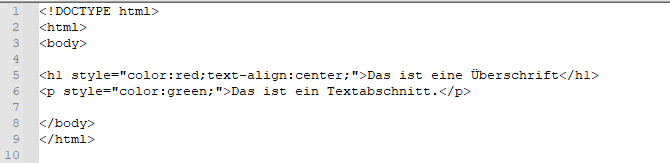
In the example, the <h1> element has been assigned the properties color: red; and text-align: center;. The <p> element has been assigned the property color: green;.
Tip: An inline style loses many of the advantages of a stylesheet, so this method should be used sparingly.
Do you have any questions about this topic? Or do you need help designing your website from a professional web agency in Munich? Then feel free to contact us!


