


A table is an organized collection of text or data. The content to be displayed is divided into rows (horizontal) and columns (vertical), which are graphically aligned with one another. HTML tables are the semantically appropriate structure for displaying tabular data in rows and columns. Several elements are responsible for creating the grid structure of a table. In the simplest case, a table consists of table rows containing table cells.
Example
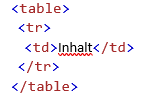
<table> starts a table (table = table). <tr> starts a new table row (tr = table row = table row). The cells (columns) of the respective row are then defined. At the end of a table row, a closing tag </tr> is added.
Table Cells
Each table cell is defined by a <td>- and a </td>-tag. Everything between <td> and </td> is the content of the table cell.
Table Rows
Each table row begins with a <tr>-tag and ends with a </tr>-tag.
Table Headers
Use the <th>-tag instead of the <td>-tag to add a header to the table. By default, text in <th>-elements is bold and centered, but these properties can be changed with CSS.
HTML Table Tags
|
Tag |
Description |
|
|
Defines a table |
||
|
Defines a header cell in a table |
||
|
Defines a row in a table |
||
|
Defines a cell in a table |
||
|
Defines a table caption |
||
|
Specifies a group of one or more columns in a table for formatting |
||
|
Specifies column properties for each column within a <colgroup>-element |
||
|
Groups the header content in a table |
||
|
Groups the body content in a table |
||
|
Groups the footer content in a table |
Example:
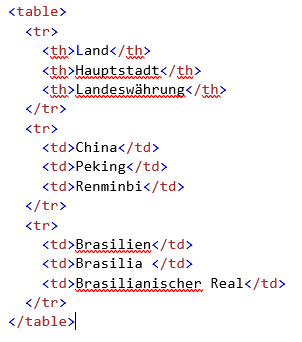
|
Country |
Capital |
Currency |
|
China |
Beijing |
Renminbi |
|
Brazil |
Brasilia |
Brazilian Real |
Do you have any questions about this topic? Or do you need help designing your website from a professional web agency in Munich? Then feel free to contact us!


