


When it comes to designing websites, sooner or later you will come across the terms Margin and Padding. Whether you are creating buttons or arranging text fields – it is difficult to avoid them. Basically, the CSS box model defines margin as “spacing” and padding as “padding”.
CSS Margin
The Margin value is used to position the element. It refers to the outer spacing. The CSS property defines a spacing to adjacent elements (e.g. the vertical spacing between two div elements in the layout of a website) as well as the spacing from the containing element.
This box has a margin of 70px
CSS provides the following properties for defining the margin for each side of an element:
margin-top- defines the outer spacing on the top sidemargin-right- defines the outer spacing on the right sidemargin-bottom- defines the outer spacing on the bottom sidemargin-left- defines the outer spacing on the left side
The following values are possible:
- auto – the browser calculates the margin
- length – specifies a margin in px, pt, cm, etc.
- % - specifies a margin as a percentage of the width of the containing element
- Inherit – specifies that the margin of the parent element (parent element) should be used
Example:
p {
margin-top: 20px;
margin-bottom: 20px;
margin-left: 50px;
margin-right: 50px;
}
CSS Padding
The CSS property padding can be used to set the inner spacing of elements (between the content and the border of the element).
This box has a padding of 70px
CSS provides the following properties for defining the “padding” for each side of an element:
padding-top– defines the inner spacing to the top edgepadding-right– defines the inner spacing to the right edgepadding-bottom– defines the inner spacing to the bottom edgepadding-left– defines the inner spacing to the left edge
The following values are possible:
- length – specifies “padding” in px, pt, cm, etc.
- % - specifies “padding” as a percentage of the width of the containing element
- Inherit - specifies that the “padding” of the parent element (parent element) should be used
Example:
p {
padding-top: 20px;
padding-bottom: 20px;
padding-left: 50px;
padding-right: 50px;
}
Overview of margin, border, padding
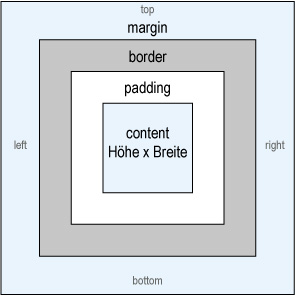
Do you have any questions about this topic? Or do you need help designing your website from a professional web agency in Munich? Then feel free to contact us!


