


Welcome to our new blog post about CSS specificity. CSS specificity is an important aspect of web design that allows developers to determine the priority of CSS rules and avoid conflicts. In this post, we will explain what CSS specificity is, how it works, and how you can use it effectively to control the appearance of your website. As an experienced web agency from Munich, we work closely with our clients to create attractive and user-friendly websites that meet current standards. We hope this post provides you with valuable insights into the world of CSS specificity, and we invite you to contact the Econcess team if you have any questions or are interested in our services. So, let's get started!
- QUICK RECAP
- HOW DOES SPECIFICITY WORK?
CSS specificity is a concept that determines the priority of CSS rules applied to an HTML element. A number of rules are taken into account to ensure that the correct styles are applied to the corresponding element.
Specificity is calculated based on the selectors used in a CSS rule. Each selector has a specific level of specificity based on the type of selector. For example, an ID selector has a higher specificity than a class or element selector.
Selector Types
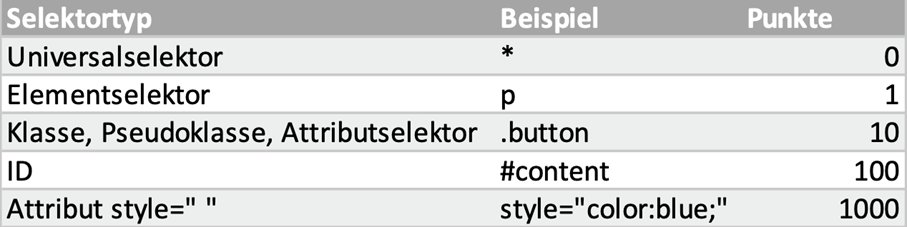
When multiple CSS rules are applied to the same element, the rule with the highest specificity is applied. For example, if an element is defined by both an ID rule and a class rule, the ID rule will be applied because it has a higher specificity.
Let's look at an example:
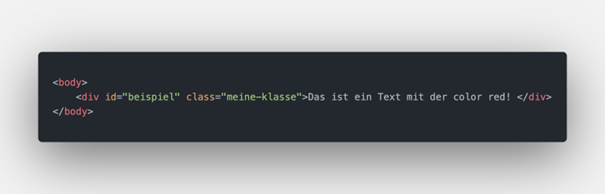
HTML:
CSS:
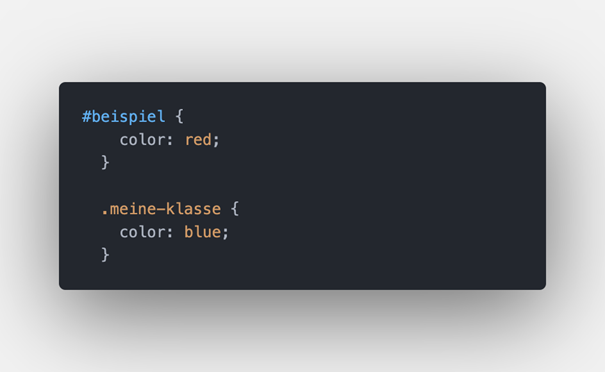
QUESTION: Which color will be applied to the text?
Explanation: In this example, the element is defined with the ID "beispiel" and the class "meine-klasse". Both CSS rules define the color of the text within the element. The ID rule has a higher specificity than the class rule because it targets the element directly, while the class rule applies to all elements with the class "meine-klasse". Therefore, the ID rule is applied and the text within the element is displayed in red.

WHAT CAN HAPPEN IF CSS SPECIFICITY IS NOT TAKEN INTO ACCOUNT?
It is important to understand how specificity works to ensure that the desired styles are applied to the correct elements. For example, if you try to define a rule for all P elements of a particular class, the rule may not be applied if other CSS rules with higher specificity exist.
!important TAGS – WHAT YOU SHOULD KNOW:
One way to control CSS specificity is to use selectors with lower specificity or mark styles with the !important tag. However, you should be careful when using the !important tag, as it is often considered bad practice and can lead to unexpected results.
Conclusion
Overall, understanding CSS specificity is an important skill for web developers to ensure that their CSS rules work correctly and that the desired styles are applied to the right elements. We hope this post has given you a better understanding of the possibilities offered by CSS selectors in web development. If you need further help designing your website or have questions about our services, don't hesitate to contact us. Our team at Econcess is happy to assist you and support you with all questions relating to web development. Thank you for your interest, and feel free to visit us again for more tips and tricks!


