

Get your website checked for accessibility
Almost 80% of the websites tested have accessibility barriers. Does yours?
BR Data · tagesschau.de, 29.10.2026
Have your website checked
Tested automatically, checked by hand, fixed in the CMS
Bavarian public broadcaster Bayerischer Rundfunk (BR) automatically tested more than 500 public-sector websites, around 100 online shops and almost 1,300 Bavarian municipalities. We test your website using the same method and also check it by hand. Whatever we find, we fix directly in your CMS.
What the BR analysis found
BR Data automatically tested home pages against the statutory minimum criteria. A page counted if it failed at least one criterion.
- 86%
Bavarian towns and municipalities
around 1,300 home pages, at least one criterion failed
- almost 80%
Public-sector websites and online shops
more than 500 public-sector websites and around 100 online shops, at least one criterion failed
- no site fully accessible
Federal government websites
Monitoring by the federal monitoring body BFIT-Bund, 2025 report
Automated tests only find some of the barriers. The real figure is likely to be higher.
Does this apply to you?
- BGG · BITV 2.0since 2020 for public-sector websites
Authorities and public bodies
Websites and apps must be accessible, with an accessibility statement and a feedback option. This also applies to municipalities, universities and public companies.
- BFSGsince June 2025
Online shops and booking portals
The Accessibility Strengthening Act (BFSG) applies to products and services offered to consumers. It is enforced by the federal states’ joint market surveillance authority in Magdeburg, which can impose fines and, in extreme cases, prohibit a shop from operating.
- UN CRPD · Art. 9always
Everyone else
Even without a legal obligation, you lose people who cannot use your website: people with visual impairments, people without a mouse, older users, people on a smartphone in bright sunlight.
Quick check: do you need to act?
Five questions. A single yes is reason enough to have your website checked.
Do you sell online to consumers, for example through a shop, bookings or appointments?
Then the Accessibility Strengthening Act (BFSG) has applied to you since June 2025.
Are you an authority, municipality, university or public company?
Then the Disability Equality Act (BGG) and BITV 2.0 apply, including an accessibility statement.
Does your website lack an accessibility statement with a feedback channel?
It is mandatory for public bodies, and shops are required to provide information on accessibility.
Is it impossible to operate your menu fully with the keyboard?
This is one of the most common findings and excludes many people.
Has your website gone unchecked since its last relaunch?
New content often brings new barriers, such as images without alt text.
Any yes? Then let us take a look at your website.
Have your website checkedWhat one of our audit findings looks like
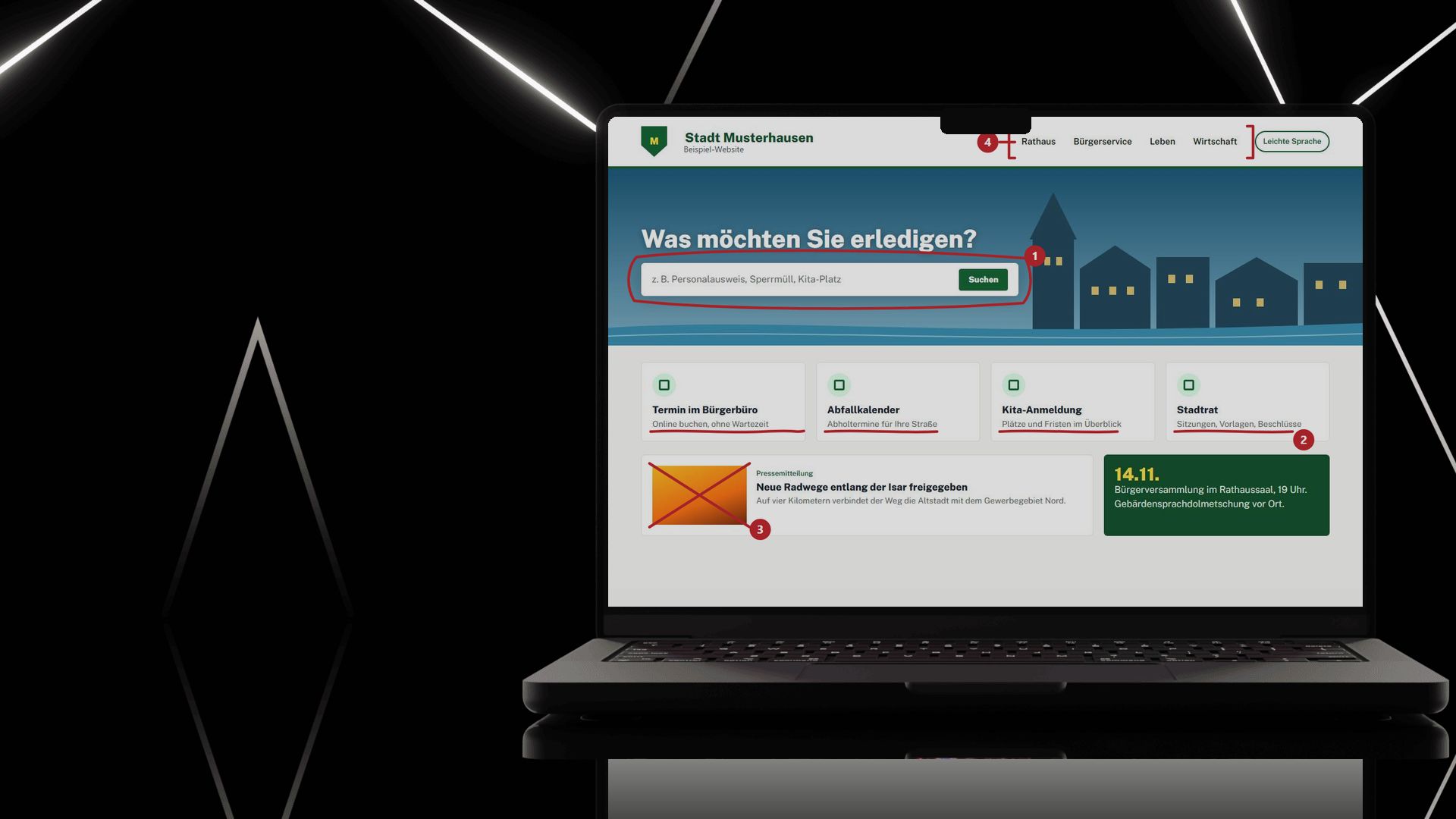
We mark every barrier where it occurs, with the WCAG criterion, the impact on users and our fix. The example is a fictitious town website.


Fictitious example. Select a marker or a finding to see which belong together.
Audit report · Home page
4 findings · 2 high · 2 medium0 open findings · 4 fixed
WCAG 2.2 AA · BITV 2.0 · tested automatically and by hand
1 Search button without a name
- What users experience
- The screen reader only announces “button”. Users who cannot see will not find the search.
- How we fix it
- The button gets the visible text “Search”, which also serves as its name.
Fixed: button is labelled “Search”.
2 Light grey subtitles
- What users experience
- Contrast of 1.9 : 1 instead of at least 4.5 : 1. In sunlight or with poor eyesight, the text is barely legible.
- How we fix it
- We set a darker text colour in the theme that reliably meets the threshold.
Fixed: contrast 7.3 : 1.
3 Press photo without alt text
- What users experience
- Blind users only hear the file name “IMG_4711.jpg”.
- How we fix it
- We make alt text a required field in the CMS and add descriptions to existing images.
Fixed: “Cycle path along the Mühlbach, two cyclists”.
4 Focus invisible in the menu
- What users experience
- Keyboard users cannot see where the focus currently is in the menu.
- How we fix it
- We remove “outline: none” from the theme and add a clear focus outline.
Fixed: 3 px focus outline in strong blue.
How we make your website accessible
- Automated test
Test automatically
All key pages with axe-core, on desktop and smartphone.
- Manual check
Check by hand
Keyboard, screen reader, zoom, forms. This is where we find the barriers no software can detect.
- Fix
Fix
Directly in the CMS: Joomla, TYPO3, WordPress, Neos, Plone, Magento or Shopware. In the code, not with an overlay as a substitute.
- Sign-off
Document
Accessibility statement and feedback channel, as required by the BITV and BFSG.
- Follow-up check
Keep it up
Regular re-testing so that new content does not introduce new barriers.
Your website check at a glance
Starting point
You don’t know how many barriers your website has, or you may be subject to obligations under BITV 2.0 or the BFSG.
What we need
Your website address, the CMS you use and, for forms or protected areas, a test login.
What you get
An audit report listing every finding with its WCAG criterion and location, sorted by urgency, plus a plan for fixing them.
What it costs
Accessibility quick check: €240 plus VAT
Automated testing plus a manual check of the most important pages. Fully credited if you go on to place an order.
What econcess does for you
- WCAG and BITV audit. We check all pages and features and draw up a prioritised roadmap.
- Action plan. With budget, resources and schedule, so you don’t have to improvise just before a deadline.
- Design and implementation. An AA-compliant component library in Figma, implemented in your CMS or web app.
- New websites. On request, we build them accessible from the ground up.
- Statement and documentation. Declaration of conformity and the documentation required under the BFSG.
- Training and monitoring. Your team learns how to edit content accessibly, and monitoring checks future changes.
More detail on our Accessibility page.
What we don’t sell
- No overlay plugins as a substitute for genuine accessibility. A tool for font size and contrast can be a useful addition, but it is no substitute for an accessible website.
- No seal of approval without a manual check.
- No “accessibility at the push of a button”.
For public administrations: Digital Umbrella Brand (Digitale Dachmarke) and KERN UX
For federal, state and local government, we deliver projects in line with the standards of the Digital Umbrella Brand and the KERN UX design system, based on BITV 2.0 and WCAG 2.1.
The Digital Umbrella Brand at econcessFrequently asked questions
Is an accessibility plugin or overlay enough?
Not as a substitute. An overlay adds a layer on top of the page but does not fix the underlying causes in the code; accessibility organisations advise against relying on one. A tool for font size and contrast can be a useful addition, but it is no substitute for an accessible website. We fix the website itself.
How long does it take?
The first test of your home page takes a few days. How long the fixes take depends on the number of pages and the system. After the test, you will know exactly.
Do we need to rebuild the website?
Usually not. Most barriers can be fixed in the existing website: labels, contrast, keyboard operation, headings. A rebuild is only worthwhile if the technology is outdated anyway.
What about PDFs and documents?
Documents on your website must be accessible too. We check them as part of the audit and show you which ones to replace, revise or remove.
Your contact for accessibility
Send us your website address and we will get back to you with a date for the first test. Accessibility quick check: €240 plus VAT, fully credited if you go on to place an order.
Bastian Kretzschmar
Dipl.-Math. oec., Managing Director
Phone: 089 700742-660 Phone:089 700742-660
