


Headless CMS, explained by a CMS agency
Maintained once, your content appears on the website, in the app and on the screen in the foyer
A headless CMS delivers content via an API. We explain when this pays off and implement it with Plone, TYPO3, Neos or Drupal.
Discuss your project
On screen: example of an information display with fictitious content
What “headless” means
A classic CMS manages content and also generates the finished web pages. A headless CMS lacks this “head”: it stores content in a structured way and outputs it via an interface (API), usually as JSON.
Websites, apps, information screens or other systems fetch the content from there and display it themselves. Editors only maintain it in one place.
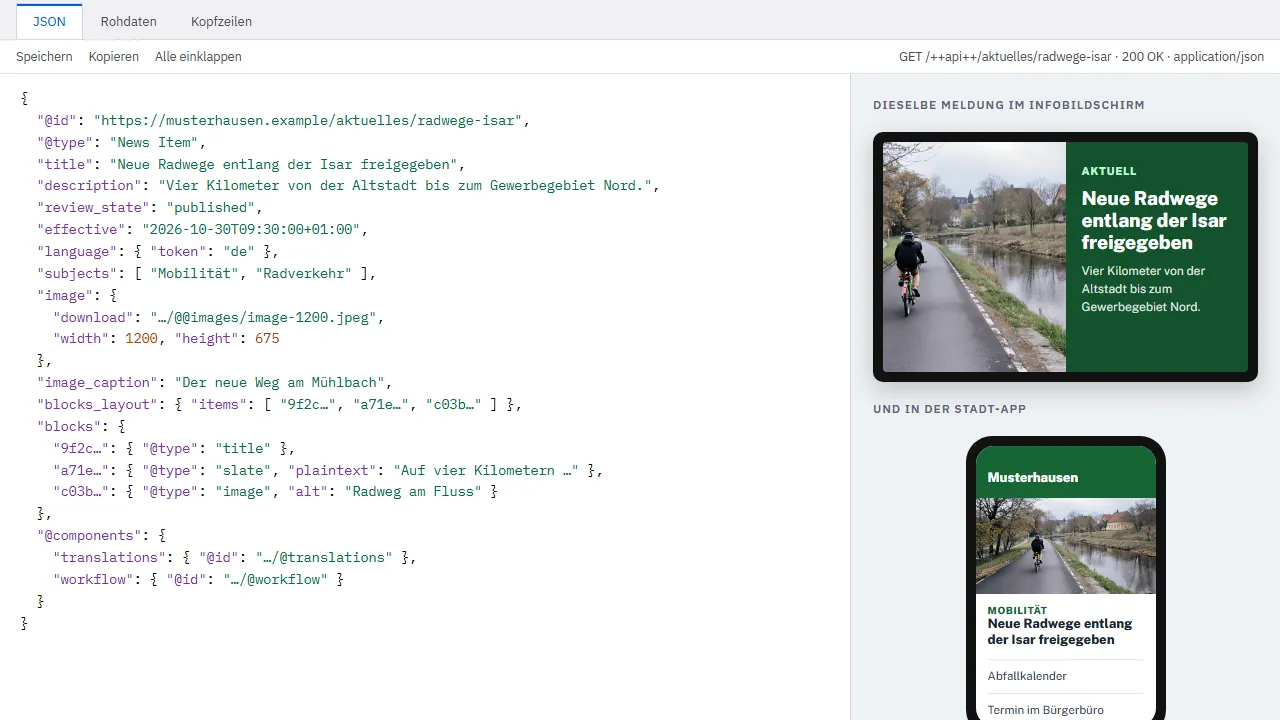
One piece of content, three outputs
The editorial team writes a news item once. The API delivers it as data, and each output displays it appropriately:
- on the website with image and text
- in the app as a short message
- on the information screen in the foyer, large and easy to read
Sample application with fictitious content
When headless pays off, and when a classic CMS is better
Headless pays off if …
- the same content appears in several channels: website, app, screens, partner websites
- the front end is built separately, for example with React or Vue
- other systems need to fetch content automatically
- you want to replace the CMS later without rebuilding every output
Probably not if …
- there is only one website: then a classic CMS is simpler and cheaper to run
- editors want to see what the page looks like while writing (with headless, this takes extra effort)
- there is no team to maintain two parts: CMS and front end
The systems we use for headless projects
You don’t have to choose between “classic” and “headless”. These systems can do both.
- Plone 6REST API in the coreVolto, the Plone front end, is itself a React application that works via this API.
- TYPO3“headless” extensionThe community extension outputs pages and content as JSON; the back end stays the same for editors.
- DrupalJSON:API in the coreContent types and fields can be retrieved via a standard interface without an additional module.
- Neosvia extensionsNeos is designed for editing directly on the page; we add an API for further channels when needed.
- WordPressREST API in the coreFor simple cases, such as when an app needs to display posts and events.
Further reading

Thinking about going headless? Tell me which channels you want to serve. A classic CMS with an API is often all you need.
Bastian Kretzschmar, Managing Director
Phone 089 700742-660 ·
Frequently asked questions about headless CMS
What is the difference between a headless CMS and a classic CMS?
A classic CMS maintains content and generates the web pages. A headless CMS only maintains the content and outputs it via an API; a separate application handles the presentation.
Is a headless CMS faster?
Not automatically. A website becomes fast through a good front end, caching and hosting. Headless can help, but it also makes the project more complex.
Is headless more expensive?
As a rule, yes, because two parts are built and maintained: CMS and front end. It pays off when several channels benefit. We give you a written estimate of the effort after an initial conversation.
Can our editors work with headless just as they do now?
With Plone 6 and Volto, yes – on-page editing is built in. With other systems, editors maintain content in forms and only see the result in a preview.
Can we switch to headless later?
Yes, if the CMS has an API. Plone, TYPO3 and Drupal can do this; the existing website continues to run and new channels are added.
Your contact for headless CMS
Bastian Kretzschmar
Dipl.-Math. oec., Managing Director
Phone: 089 700742-660
Discuss your project